 dathent.
Upload, play and reuse your media in ChatGPT
Add your own videos, play them in ChatGPT, and choose photos to reuse unchanged or guide a new visual. Plus clearer post previews and fixes to scheduling.
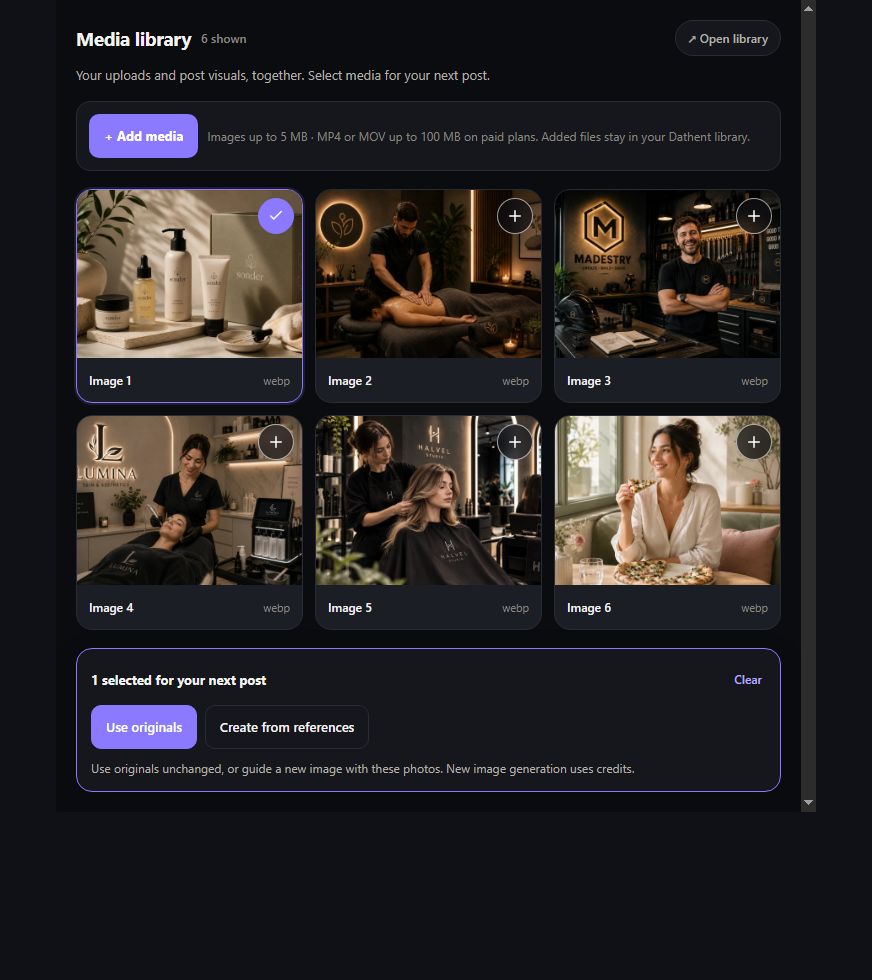
Your own videos and photos can now be part of your Dathent workflow right inside ChatGPT. Upload a clip, watch it back, and use it in a draft—or choose images as references for a new visual.
- Upload videos inside ChatGPT: open Dathent’s Media library, choose Add media, and select an MP4 or MOV from your device. Paid plans support videos up to 100 MB.
- Play and review before posting: watch saved videos with playback controls, open photos at full size, and swipe through a carousel.
- Choose what happens to your media: Use originals keeps your photos or video unchanged. Create from references uses selected photos to guide a new image.
- Find more of your content: uploaded files and visuals saved from posts are now together in the media library.
- Scheduling fixed: the post preview uses the post’s selected social channels. Draft labels and carousel controls are clearer, too.
- A clearer creation flow: review your selected files, follow draft creation, and check the finished post on desktop or mobile.
For a video attached to a chat message, use Add media in the Dathent widget to upload the original file from your device. Creating a new image uses your plan’s image allowance; reusing an original keeps it unchanged. Nothing is published until you choose to publish.